How to track habits in Apple Reminders
Apple Reminders can already hold your habits. What it cannot do is show how they are going.
In Reminders alone
- Make a list for your habits, like Habits.
- Add each habit as a reminder: run, read, stretch.
- Open each one, turn on Repeat, and pick Daily, or the days you keep it.
When you tick a repeating reminder, Reminders completes that day’s and moves the reminder to the next one. Siri can tick it (“mark run as done”), and it syncs to every device on your Apple Account.
That is enough if all you need is a nudge. Reminders keeps every completed day, but it does not show them as a streak, a week or a year, and it has no idea of a goal like 3 days a week, a count like 100 reps, or a rest day.
With Alto Daily
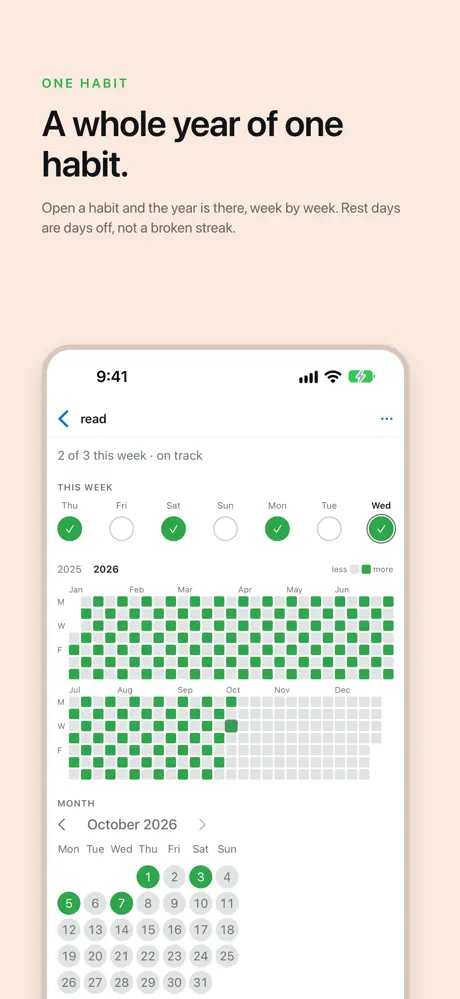
Alto Daily reads the repeating reminders in the lists you choose and shows them as habits: what is left today, each habit’s last seven days, its streak and its year. Ticking a habit in Alto Daily completes the reminder in Reminders, so nothing is kept anywhere else.
- Get Alto Daily on your iPhone, iPad or Mac.
- Let it read Reminders. Nothing else is asked for.
- Pick your habits list. Every repeating reminder in it becomes a habit.
Goals, counters and rest days are written as lines in the reminder’s own notes, so they stay with the reminder in Reminders. More on goals.
Delete Alto Daily and nothing is lost: every day is still a completed reminder in your list.